How to use MCP servers without coding: a plain-English guide
MCP lets an AI agent use your apps, like Notion, GoHighLevel or Stripe. Here's what it is, and how to connect your first MCP server in a few clicks, with no terminal.
By Ijlal Ahmed · · Updated
MCP is what lets an AI agent actually use your apps. Instead of telling you where to click in Notion or GoHighLevel, the AI can open the record, read it and make the change itself.
The problem is that almost every MCP guide is written for developers. They start with “open your terminal”, “install Node” and “edit this JSON file”. If you run a business on your own, you have better things to do.
This guide skips all of that. You’ll learn what MCP is in one minute, then connect your first server in a few clicks.
What is MCP, in one minute
MCP stands for Model Context Protocol. It’s a shared standard for connecting AI to software.
Think of it like a phone charger standard. Before USB-C, every phone needed its own cable. Before MCP, every AI app needed its own custom connection to every tool. Now an app makes one MCP server, and any AI that speaks MCP can use it.
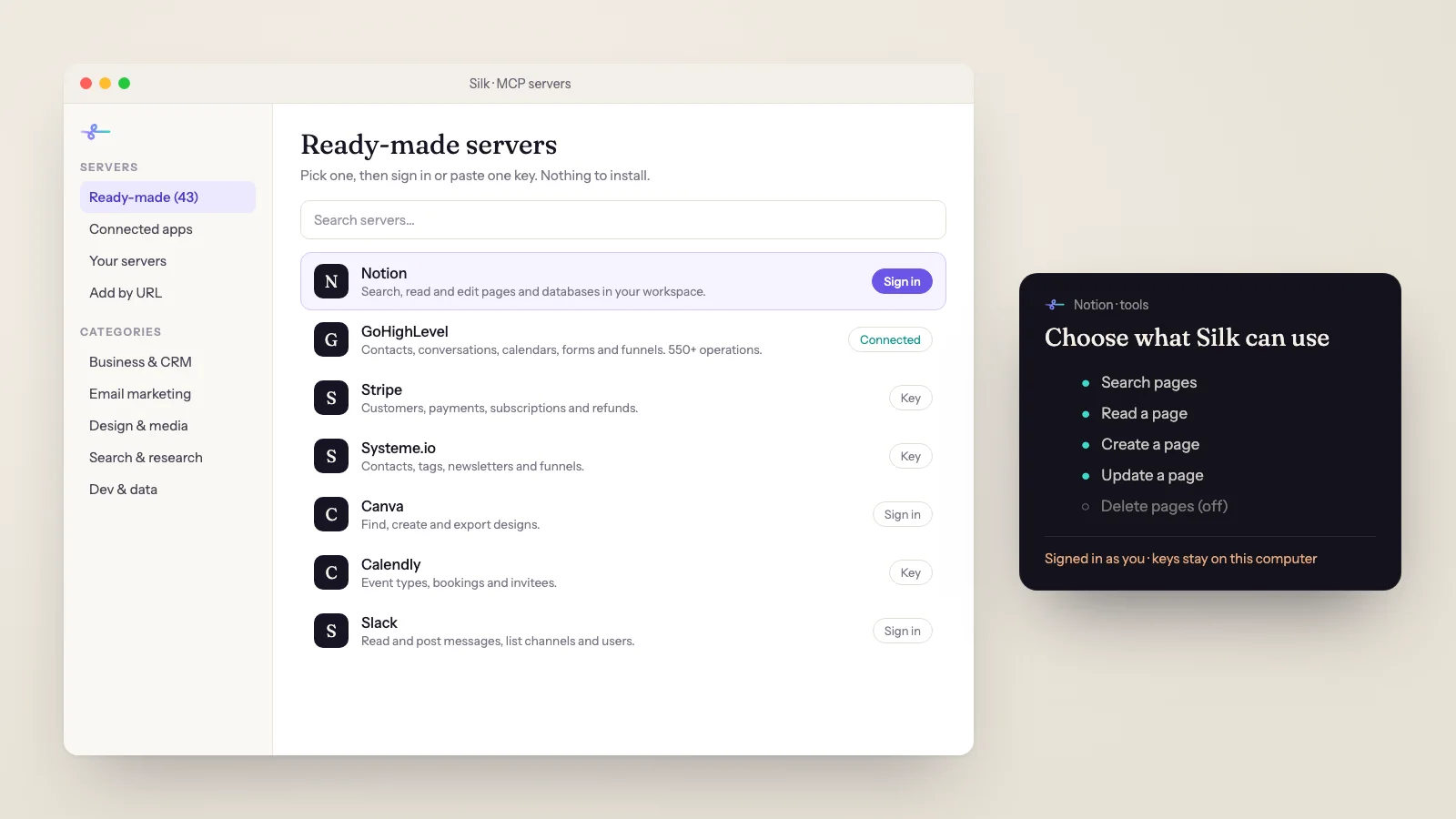
An MCP server gives the AI a set of tools. The Notion server, for example, gives it tools like “search pages”, “read a page” and “update a page”. When you ask for something, the AI picks the right tool, runs it and reads the result.
| Without MCP | With MCP |
|---|---|
| The AI tells you which buttons to press | The AI does the steps itself |
| You copy data out of the app and paste it into a chat | The AI reads the data straight from the app |
| One-off answers | Repeatable jobs you can schedule |
Why MCP setup feels hard
There are two kinds of MCP server, and both are usually explained in developer terms.
- Remote servers run on the app’s own website. You connect with a web address and sign in. These are the easy ones.
- Local servers run on your computer. They usually need Node.js or Python installed, a command typed into a config file, and an API key pasted into the right spot.
Most of the friction is the second kind: a missing install, a typo in a file path, a key in the wrong place. None of it is hard once it’s done. It just shouldn’t be your job.
How to connect an MCP server with no code
Here’s the whole process in Silk, the desktop AI agent for Mac and Windows. It comes with 43 ready-made MCP servers, and it ships with the runtimes they need, so there’s nothing else to install.
- Open the MCP window. In Silk, go to Settings and open MCP.
- Pick a server from the list. The ready-made ones include Notion, Slack, GoHighLevel, HubSpot, Stripe, Systeme.io, Klaviyo, Mailchimp, Meta Ads, Canva, Airtable, Calendly, Typeform, GitHub, Supabase and more.
- Sign in or paste one key. Servers that support it open a normal sign-in page in your browser. Others ask for one API key, and each server links to its own docs so you can see where to get it.
- Switch off the tools you don’t need. Every server lists its tools. Turn off anything you don’t want the AI to use, like deleting records or issuing refunds.
- Ask for a job in plain words. “Find every Notion page about the spring launch and make me a one-page summary.” Silk picks the Notion tools on its own.
That’s it. No terminal, no config file and no Node.js install.
Example: connecting GoHighLevel
GoHighLevel is the most connected business app among Silk users, so here it is step by step.
- In your GoHighLevel sub-account, open Settings, then Private Integrations, and create a token.
- Tick the areas you want Silk to reach, such as Contacts, Conversations, Calendars, Forms and Funnels.
- In Silk, pick GoHighLevel from the MCP list and paste the token. If you used an agency-level token, add the Location ID as well.
- Ask: “Show me every contact who filled in the website form this week and hasn’t had a reply.”
One connection covers one sub-account. GoHighLevel’s current MCP server gives the AI more than 550 operations, from forms and bookings to funnels and pages.
Five jobs to try once you’re connected
- Notion: “Turn the notes from today’s client calls into one page per client, with next steps at the top.”
- GoHighLevel: “Tag every lead from the webinar form as webinar-nov and add them to the follow-up workflow.”
- Stripe: “List every failed payment this month with the customer’s email, and draft a friendly retry email for each.”
- Systeme.io or Mailchimp: “Create a draft newsletter for the list about our Black Friday offer. Don’t send it.”
- Calendly plus Notion: “Every morning, make a page with today’s calls and what I know about each person.” (That one runs as a schedule. Schedules run on your computer, so it needs to be on with Silk running.)
Tips that save you a headache
- Don’t switch on every tool. A server with 100 tools gives the AI 100 choices. Fewer tools means faster, more accurate work.
- Start with one app. Use it for a week before adding the next one.
- Read-only first. If you’re nervous, connect with read-only access and let the AI report before it edits anything.
- No MCP server? Use the browser. Silk can work in any web app you’re logged in to on your computer. MCP is faster when it exists, but it isn’t required.
If you’re a member of the Smooth Operators community, Silk also has a Connected apps tab with more than 1,500 apps, such as Gmail, Google Sheets, Drive, Docs and Calendar, each connected with one sign-in.
Where to go next
- See a full job built on connected apps: the AI morning briefing.
- Let Silk fix pages on your site directly: WordPress SEO fixes.
- New to Silk? Start with what Silk is and how it works, or see pricing.
Questions
- What is an MCP server, in plain English?
- An MCP server is a small connector that lets an AI agent use one app or service. The Notion MCP server lets the AI search and edit your Notion pages, the Stripe one lets it look up payments, and so on. MCP stands for Model Context Protocol, the shared standard most AI apps now use for these connectors.
- Do I need to know how to code to use MCP?
- No. Most of the setup guides online are written for developers and start in a terminal, but you don't have to work that way. In Silk you pick a server from a list, then either sign in to the app or paste one key. Silk runs the server for you.
- Do I need to install Node.js or Python for MCP servers?
- Many MCP servers are built on Node.js or Python, which is why guides tell you to install them. Silk ships with its own copy of the runtimes those servers need, so the ready-made servers work on a fresh Mac or Windows computer.
- Is it safe to connect my apps to an AI agent?
- Connect only the apps a job needs, and switch off tools you don't want the AI to touch, such as delete or refund. Keys stay on your computer. Silk asks before anything it can't undo, and you can stop it at any time.
- Which MCP servers should a solopreneur start with?
- Start with the app you spend the most time clicking around in. For most people that's their CRM (GoHighLevel or HubSpot), their notes (Notion), their payments (Stripe) or their email platform (Systeme.io, Klaviyo or Mailchimp). Add one, use it for a week, then add the next.
- What if the app I use has no MCP server?
- Silk can still work in it. It uses the browser you're already logged in to on your computer, so it can click and type in any web app, the same way you would. MCP is faster and more reliable when it exists, but it isn't required.