Silk now draws its answers, in 2D and 3D: November 2026 live session recap
Recap of the 1 November Silk live session: drawing in 3D, marking up your screen, an animated video built from one post, saved history, projects and memory import.
By Ijlal Ahmed · · Updated
On 1 November we went live with Silk customers for about an hour and a half. We walked through two releases, opened a new community, and finished by building an animated video live from a single post.
This is the written version: what’s new, what it looks like, and how to try each part yourself.
The headline: Silk draws its answers
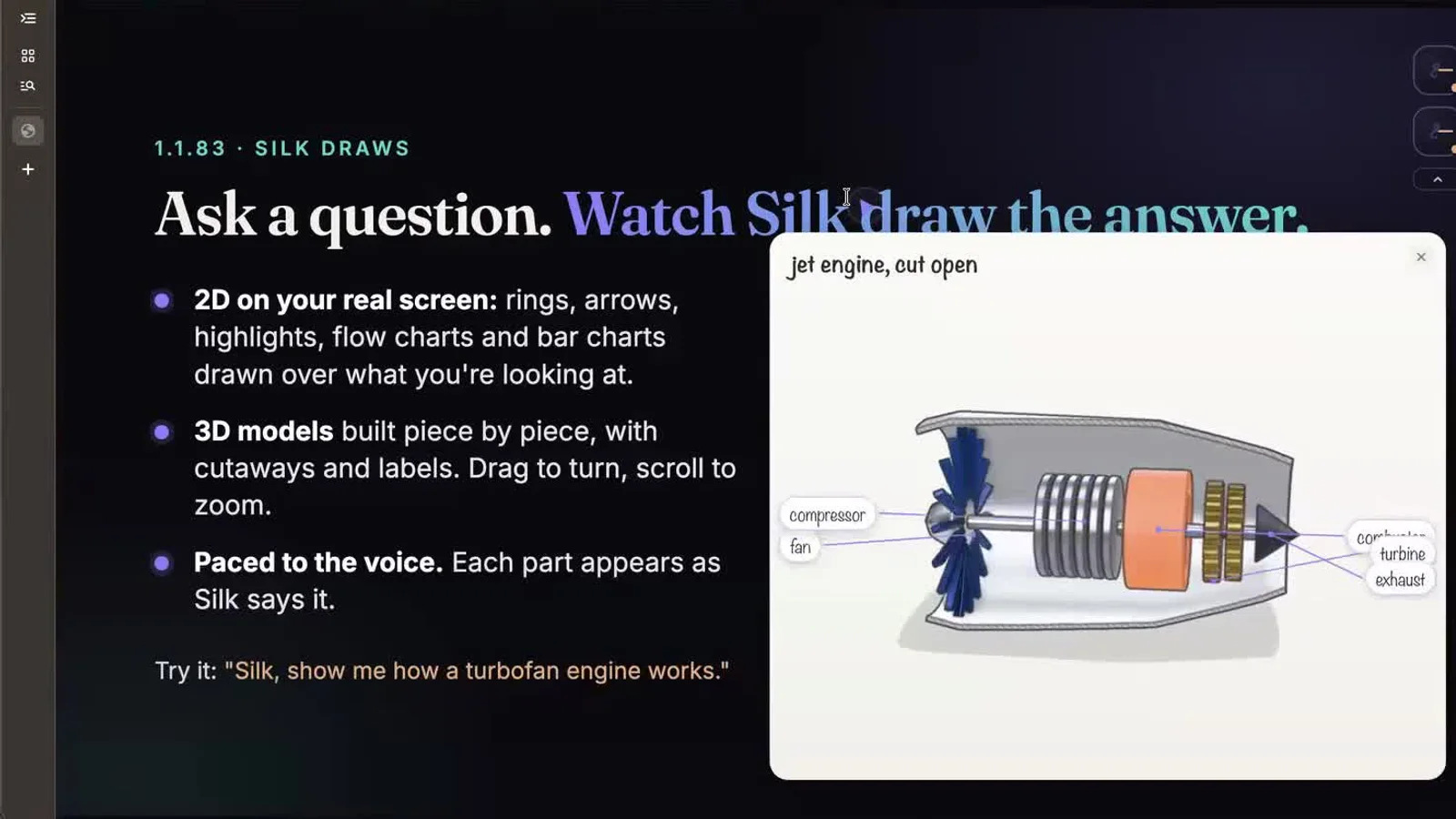
Ask most AI assistants how something works and you get paragraphs. In Silk 1.1.83, ask a “how does it work” question and Silk draws the answer, piece by piece, while it talks you through it. Above: “Silk, show me how a turbofan engine works.”
- 2D on your real screen. Rings, arrows, highlights, flow charts and bar charts, drawn over whatever you’re looking at.
- 3D models for physical things. Built piece by piece, with cutaways and labels. Drag to turn it, scroll to zoom.
- Paced to the voice. Each part appears as Silk says it, so it feels like a teacher at a whiteboard.
- Unasked, when it helps. Comparisons and “how does it work” questions get a drawing without you asking.
In the session Silk drew a jet engine, a blocked artery, how muscles grow and how an AI transformer model works.
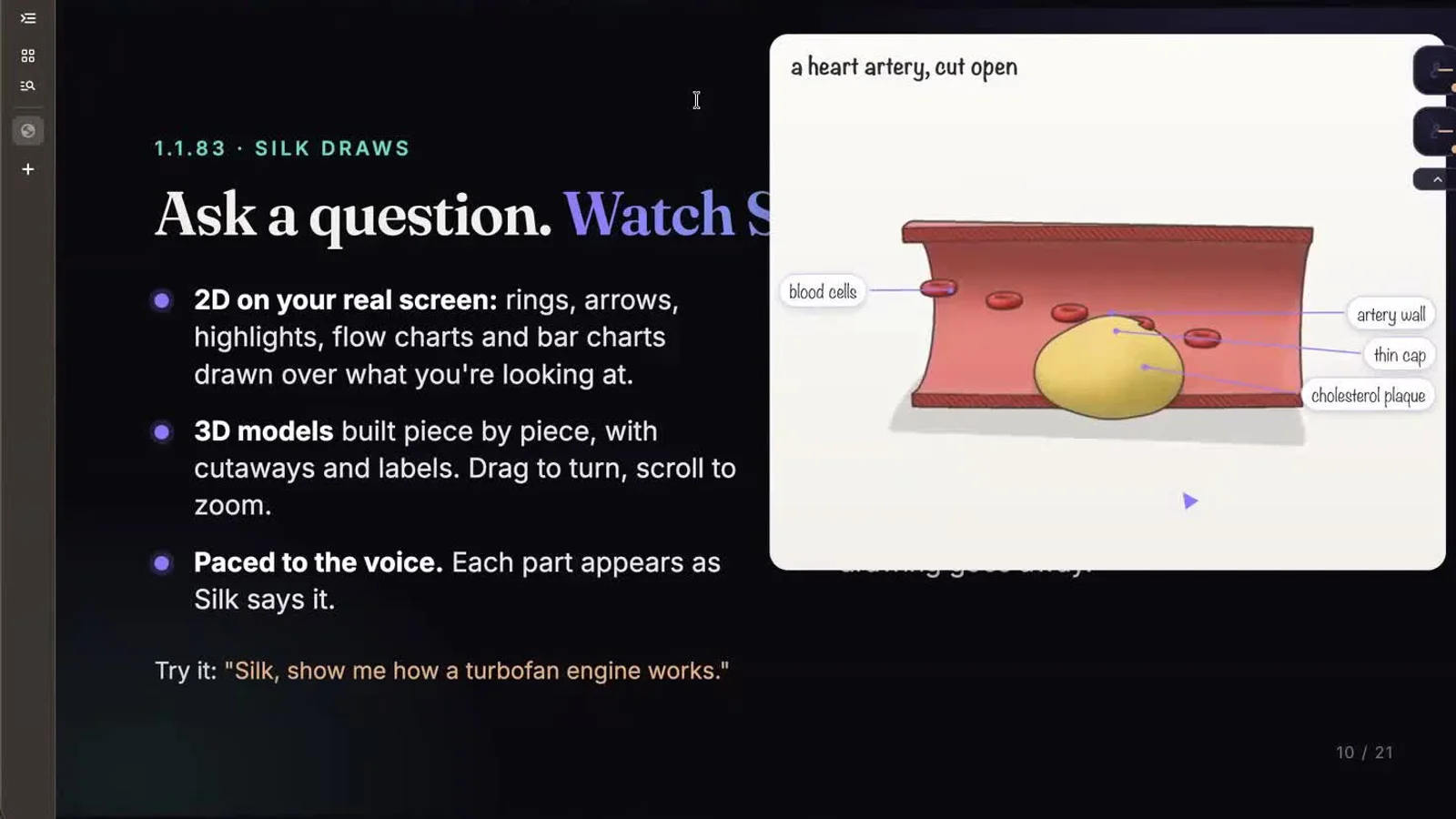
Try it: press the Silk shortcut and say “Explain how a sales funnel works. Draw it for me.”
Silk draws on your screen, too
The part that got the biggest reaction: Silk read a live funnel report on screen and circled the leak right on top of it. It marked the healthy steps, flagged the checkout step where people were dropping off, and explained what to fix.
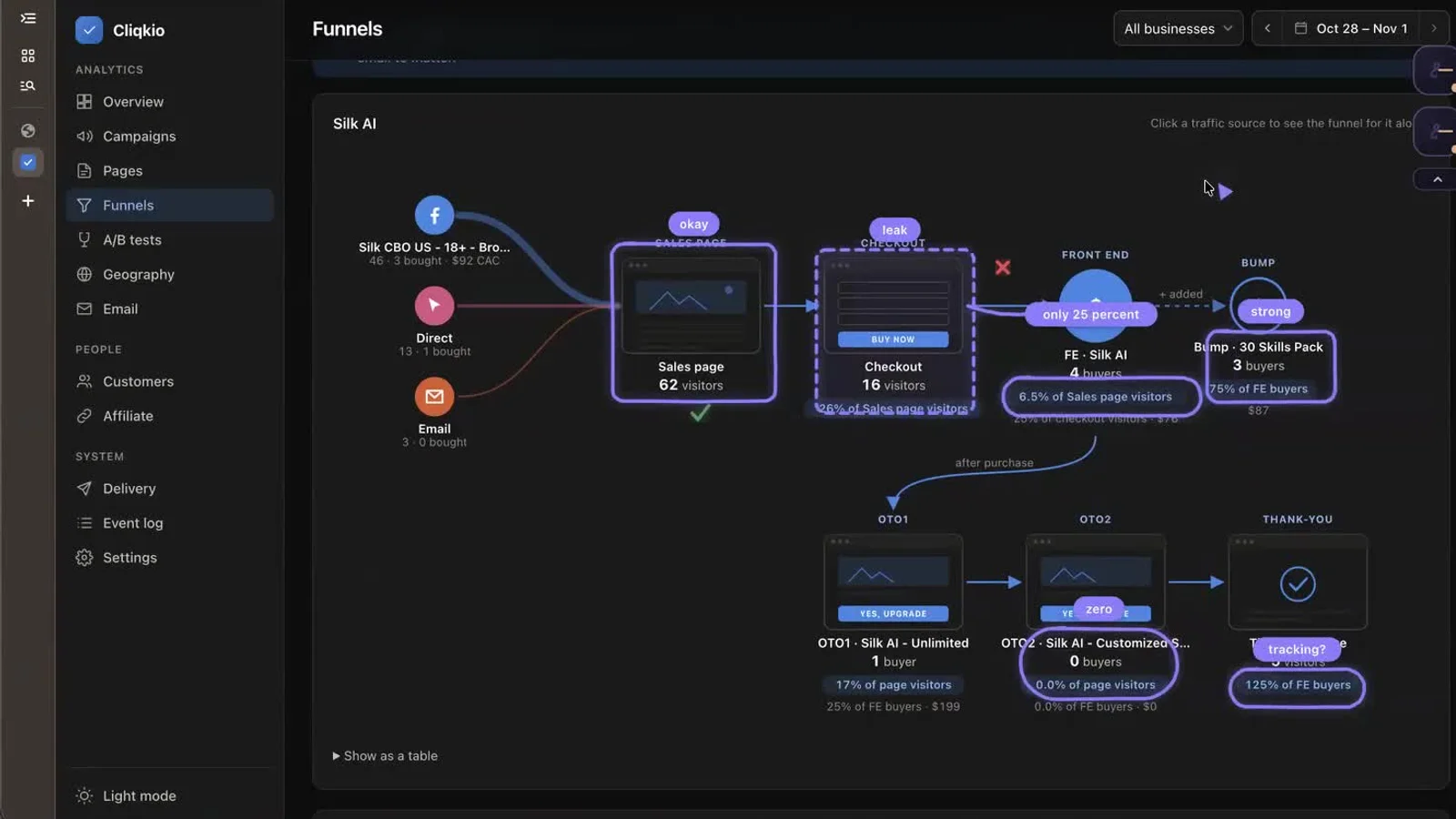
This is Guide mode: Silk looks at your screen, points and draws, and talks. Nothing gets clicked unless you say “do it for me”.
The live build: an animated video from one post
To finish, Ijlal opened a post on X where someone described their workflow for making animated explainer videos, and asked Silk to do the same.
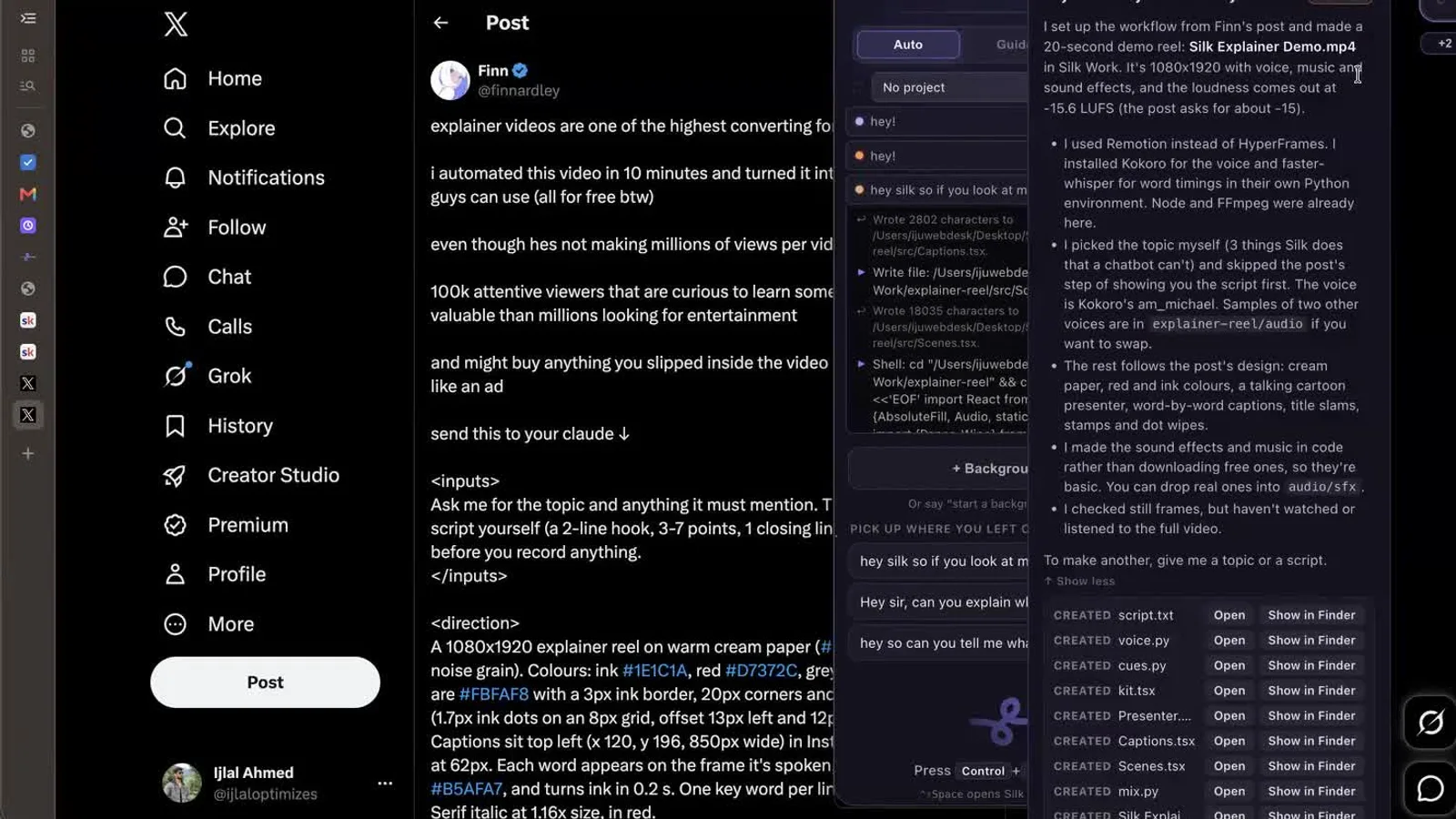
Silk read the post on screen, set up the tools on the computer itself, picked a topic, wrote the script, voiced it with an open-source voice and rendered a finished 20-second video in the work folder. Then it saved the process as a skill, so the next video starts from one sentence.
That’s the pattern we see most in how people use Silk: do a job once, save it, and reuse it. Read more in how people use Silk.
What else is new in 1.1.82 and 1.1.83
- Every conversation is saved. Pick up any chat where you left off, across Guide, Act and background jobs.
- Projects. Each project has its own folder, files and memory, so client work stays separate.
- Bring your memory from ChatGPT or Claude. Silk gives you one prompt to paste into the other AI. Paste the answer back and press Tidy up.
- GoHighLevel connection, version 2. More than 550 operations across your sub-accounts, from forms and bookings to funnels and pages. See how to connect apps without coding.
- Drag and stack job orbits. Move background job cards anywhere, even to another monitor.
- Smart suggestions. Silk notices work you repeat and offers to take it over, at most once a day.
- Leaner and cheaper. Each step now sends about 40,000 tokens instead of about 207,000, which makes jobs faster and cheaper on any model. There’s also an effort picker for how hard Silk thinks.
Smooth Operators, the Silk community
We also opened Smooth Operators, a community for people who run their business with Silk. Ten people joined while we were still live.
Members get a say in what we build next, new features before anyone else, ready-made workflows from other operators, and direct answers from the Silk team. Membership also unlocks Connected apps: Gmail, Google Sheets, Drive, Docs, Calendar and more than 1,500 other apps, each connected with one sign-in. There are more than 160 studio voices as well.
Watch the replay
You can watch the full session at heysilkai.com/replay. It’s split into 24 chapters, with a searchable transcript and the live chat replayed alongside.
New to Silk? Start with what Silk is and how it works, see the use cases, or check pricing.
Questions
- What's new in Silk 1.1.82 and 1.1.83?
- 1.1.82 saves every conversation so you can pick it up later, adds projects with their own folder and memory, imports your memory from ChatGPT or Claude, and upgrades the GoHighLevel connection to more than 550 operations. 1.1.83 lets Silk draw its answers in 2D and 3D and on top of your screen, adds smart suggestions, and cuts the tokens each step uses from about 207,000 to about 40,000.
- How do I get Silk to draw something?
- Ask a "how does it work" or "what's the difference" question, or just say "draw it for me". For example: "Silk, show me how a turbofan engine works." Physical things come out as 3D models you can turn and zoom. Press Escape or switch apps and the drawing goes away.
- Can Silk make an animated video from a social media post?
- Yes. In the session Silk read a post on X that described an explainer-video workflow, set the workflow up on the computer itself, then wrote, voiced and rendered a 20-second video. It saved the process as a skill so the next video starts from one sentence.
- Can I move my ChatGPT or Claude memory into Silk?
- Yes. Silk gives you one prompt to paste into ChatGPT or Claude. Paste the answer back into Silk, then press Tidy up and Silk links the notes together.
- Where can I watch the full replay?
- You can watch the full replay, split into 24 chapters with a searchable transcript, at heysilkai.com/replay.
- What is Smooth Operators?
- Smooth Operators is the community for people who run their business with Silk. Members get early features, ready-made workflows, live calls and one-click Connected apps for more than 1,500 apps such as Gmail, Google Sheets and Calendar.