
What 9,662 tasks tell us: 10 ways people actually use an AI agent on their computer
Real usage data from 60 days of Silk: what people hand to a desktop AI agent, how long the jobs take, what they cost and which uses are growing fastest.
By Ijlal Ahmed · · Updated
Everyone has an opinion about what AI agents are for. We’d rather show you.
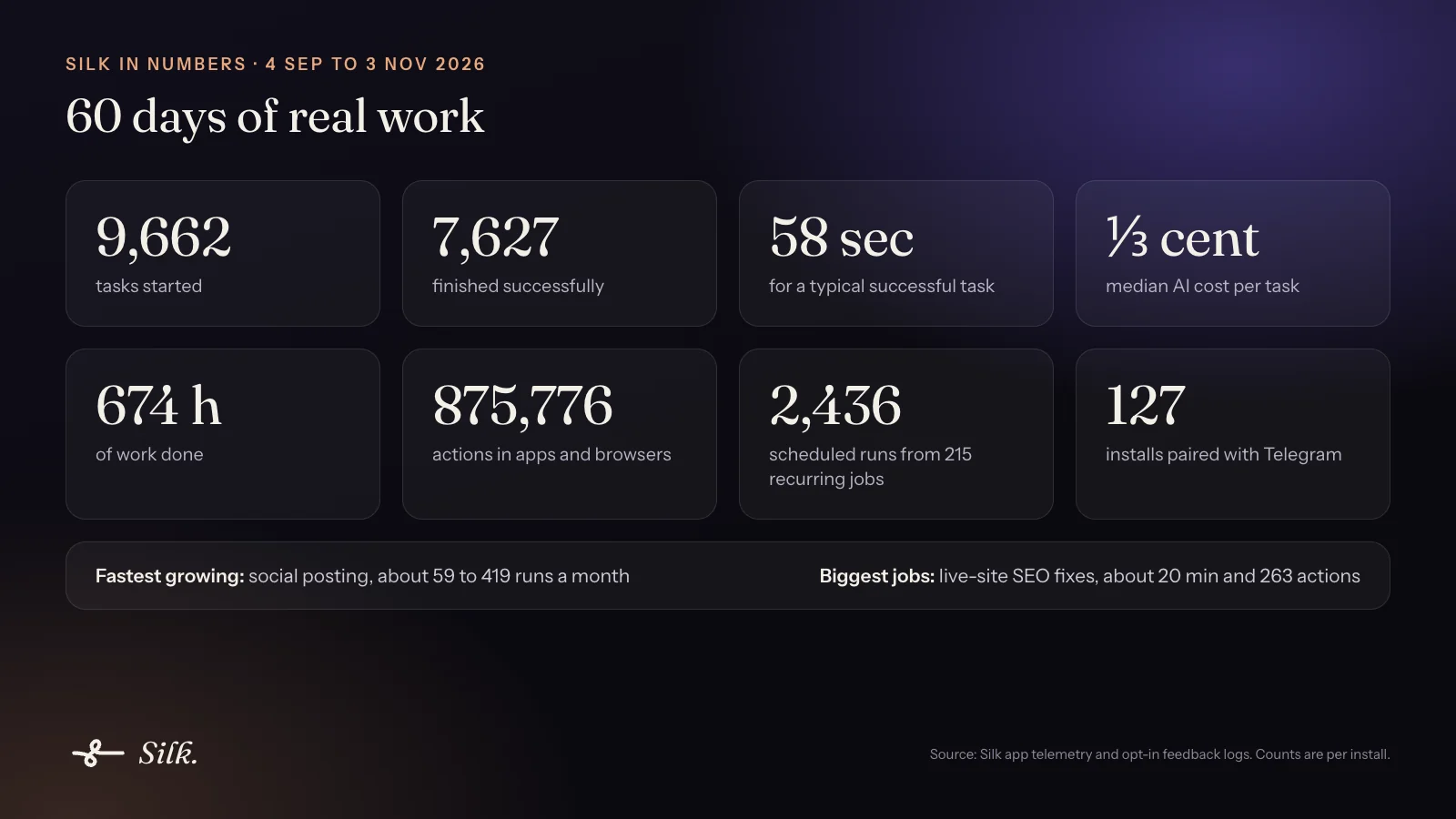
Silk is a desktop AI agent for Mac and Windows. It works in your own apps, browser and folders. Between 4 September and 3 November 2026, Silk users started 9,662 tasks and 7,627 finished successfully. Here’s what those tasks were.
The headline numbers
- 9,662 tasks started, 7,627 finished successfully.
- 58 seconds for a typical successful task.
- About a third of a cent median AI cost per task (0.0034 US dollars).
- 674 hours of work done, made up of 875,776 actions in apps and browsers.
- 21% of finished tasks ran on a ChatGPT or Claude subscription the user already had (37 installs).
How we counted: the data comes from Silk app telemetry, which users can turn off, plus logs users chose to attach to feedback. Counts are per install, not per person. Every example below is anonymized and lightly paraphrased.
1. A chief of staff that runs on a schedule
Wake up to a briefing. Go to bed with a recap.
Silk users set up 215 recurring jobs, and those ran 2,436 times. That’s 22 users who now get work done before they ask. 91% of those schedules were set up just by asking in plain words. Email tasks grew 3.2x in the last 30 days.
Real examples:
- A morning digest of today’s calendar and the unread emails that need action.
- A nightly “what you got done today” note, dated and saved to a work folder.
- A 2 PM sweep of six Gmail and Google Calendar accounts that copies tomorrow’s Zoom calls onto one master calendar.
- An inbox “front desk” that sorts the alerts and drafts replies for review.
Try it: an AI morning briefing that runs itself.
2. Social posting on autopilot
Your posts go out every morning at 8. You don’t have to be there.
This is the fastest-growing use. Social posting went from about 59 runs a month to 419, a 7.1x jump, across 18 users.
- A real estate agent who has Silk find five new listings within 50 miles of a zip code every morning and post them, with photos and links, to a Facebook business page.
- A content engine that posts three times a week, each post with its own graphic.
- Updating group descriptions, profile copy and business hours across several social accounts.
Try it: auto-post to social media from your own accounts.
3. Competitor and market reports, delivered as a PDF
Name a business. Get a client-ready competitor report.
Research is the most widely used task type: 61 users in 30 days, with an 86% success rate. Report tasks grew 3.3x.
- An agency owner who, for every prospect, asks: “Create a high-class PDF report about this company and find their 5 top competitors.” They’ve done this for electricians, drywall contractors and restoration firms.
- A weekly “what happened in AI” PDF saved to the desktop.
- Checking whether a 995 US dollar product is worth it: what’s included, who makes it, real reviews and overlap with tools already paid for.
Try it: a competitor report PDF in minutes.
4. A one-person local media company
Research, fact-check and draft a week of local articles while you sleep.
406 writing tasks from 40 users, with an 86% success rate.
- A publisher of four local newsletters who gets five SEO articles for each one, 500+ words, linking the local businesses mentioned.
- Fact-checking older articles against the web and updating addresses and links.
- Researching local businesses, checking the details are right, then writing spotlight features about them.
5. SEO fixes made directly on the live website
Silk doesn’t just tell you what to fix. It logs into WordPress and fixes it.
These are the biggest jobs people hand to Silk: 424 SEO tasks from 26 users. Each took about 20 minutes and 263 actions.
- A written work order: “fix the orphaned headings on the Tree Service and Pool pages, then the structural gaps”, carried out across six industry pages.
- Updating the SEO title and meta description on a published page, “and change nothing else”.
- Keyword research and long-tail links added to articles before they go live.
Try it: fix SEO on your WordPress site.
6. A Shopify store operator
Show Silk one product page you love. It makes the rest match.
136 ecommerce tasks from 21 users. At about 23 minutes each, these are the longest jobs of all.
- Rewriting plain product descriptions into an icon-and-benefit layout.
- “Make this product page look like that one”, applied across the whole catalog.
- Importing reviews, assigning categories and adding a track-your-order page.
- Recording the product-page routine once as a skill and replaying it for every new product.
That last habit is common. 22 users recorded 233 skills, and 12 of them replay those skills.
7. Lead generation and follow-up that doesn’t stall
Silk finds the leads, ranks them, and writes the follow-up.
223 lead-gen tasks from 25 users, up 1.9x. Real estate turns up in four users’ logs.
- A daily lead pull from a property-lead platform, with sellers ranked by how likely they are to sell and the best outreach for each.
- Keeping an SMS follow-up sequence in a spreadsheet up to date as replies come in.
- A five-day email follow-up series for a prospect.
8. An operator inside your CRM and business apps
Silk works inside GoHighLevel, Notion, Canva and the apps you already pay for.
37 installs connected at least one business app. The most common were GoHighLevel (15), Notion (7), Canva (6), Systeme.io (5) and GitHub (5).
- Installing a GoHighLevel snapshot into a brand-new sub-account.
- Checking a CRM conversation for a client’s reply and acting on it.
- Connecting a website inquiry form to the CRM.
9. It learns your tools so you don’t have to
Bought another tool you never set up? Point Silk at the tutorials.
- “Go here, watch the tutorials, then set up every part of the account integration.”
- Turning a course’s training pages into a reusable skill.
- Auditing a software stack: “Which of these tools should I get rid of?”
Only four users’ logs show this so far, but it matches what buyers keep writing on our intake forms: “too many tools I bought recently that I need to learn how to use.” Silk’s Guide mode goes a step further and shows you on your own screen where to click.
10. Run it all from your phone
Text Silk from anywhere. It does the work on your computer.
127 installs paired Silk with Telegram. 41 of the 215 schedules (19%) were created from Telegram or by voice.
- Sending Silk a file over Telegram to act on.
- Setting schedules and reminders by text or voice note.
Try it: run your computer from Telegram.
What this tells us about AI agents
Three things stand out.
- People hand off whole jobs. The most valuable tasks aren’t questions. They’re 20-minute, 263-action jobs inside a real website admin or store.
- Schedules turn an assistant into staff. Once someone has a morning briefing they stop thinking of it as a chatbot. And almost everyone set theirs up just by asking.
- The work lives on your computer. WordPress, Shopify, GoHighLevel and six Google accounts, all logged in as the user. That’s why we built Silk to run on your machine rather than on a cloud computer. See how that compares in our guide to always-on AI agents.
Want to try any of these? Silk is 9 US dollars a month, and the first day is free.
Questions
- What do people use AI agents for?
- In 60 days of Silk usage, the most common job was research, especially competitor and market reports, followed by writing, live-site SEO fixes, lead generation, ecommerce store work, scheduled briefings and posting to social media. The biggest single jobs people hand off are SEO fixes made directly on their own website.
- How long does an AI agent task take?
- A typical successful Silk task took 58 seconds. Bigger jobs take longer: SEO fixes on a live site averaged about 20 minutes and 263 actions, and Shopify store jobs averaged about 23 minutes.
- How much does an AI agent task cost to run?
- The median successful Silk task cost about a third of a cent (0.0034 US dollars) in AI model fees. People running Silk on a ChatGPT or Claude plan they already pay for have no per-task cost at all.
- Where does this data come from?
- From Silk's app telemetry, which users can turn off, and from logs that users chose to attach to feedback, between 4 September and 3 November 2026. Counts are per install, and every example is anonymized.
- Can an AI agent run tasks on a schedule?
- Yes. Silk users set up 215 recurring jobs that ran 2,436 times in 60 days, and 91% of those schedules were created just by asking in plain words, by chat, voice or Telegram.