How to use your ChatGPT or Claude subscription to run an AI agent
You already pay for ChatGPT Plus or Claude Pro. Here's how to let an AI agent run on that plan to do real work on your computer, with no API key and no second AI bill.
By Ijlal Ahmed · · Updated
You already pay for ChatGPT or Claude every month. So when an AI tool asks you for an API key and a credit card on top, it feels like paying twice for the same brain.
You don’t have to. A few apps now let you sign in with the plan you already have, and the AI work counts against that plan instead of a separate bill. This guide explains how that works, which plans are worth using, and how to set it up in Silk so an AI agent does real jobs on your computer using your ChatGPT or Claude subscription.
Chat plan vs API key: the 60-second version
There are two ways to pay for AI, and most tools only explain one of them.
| Your ChatGPT or Claude plan | An API key | |
|---|---|---|
| How you pay | A flat monthly fee you already pay | Per use, from prepaid credit |
| What you set up | Sign in with your account | Create a developer account, add a card, copy a key |
| Limits | Usage windows, such as every 5 hours and every week | Only your credit and any spend limit you set |
| Best for | Daily work at a fixed cost | Picking any model, or very heavy use |
Most guides on this topic list apps that accept “Sign in with ChatGPT” and stop there. Almost all of those apps are tools for programmers. If you run a business on your own, the more useful question is: can the plan I pay for actually do my admin, research and busywork? That’s where an AI agent comes in.
What an AI agent does with your plan
A chat app answers you. An agent does the job. You give it a task in plain words, and it opens your apps, works in your browser, writes the files and comes back when it’s finished.
When an agent runs on your ChatGPT or Claude plan, the “thinking” part comes out of your existing allowance. The agent provides the hands: the clicking, typing, reading and saving.
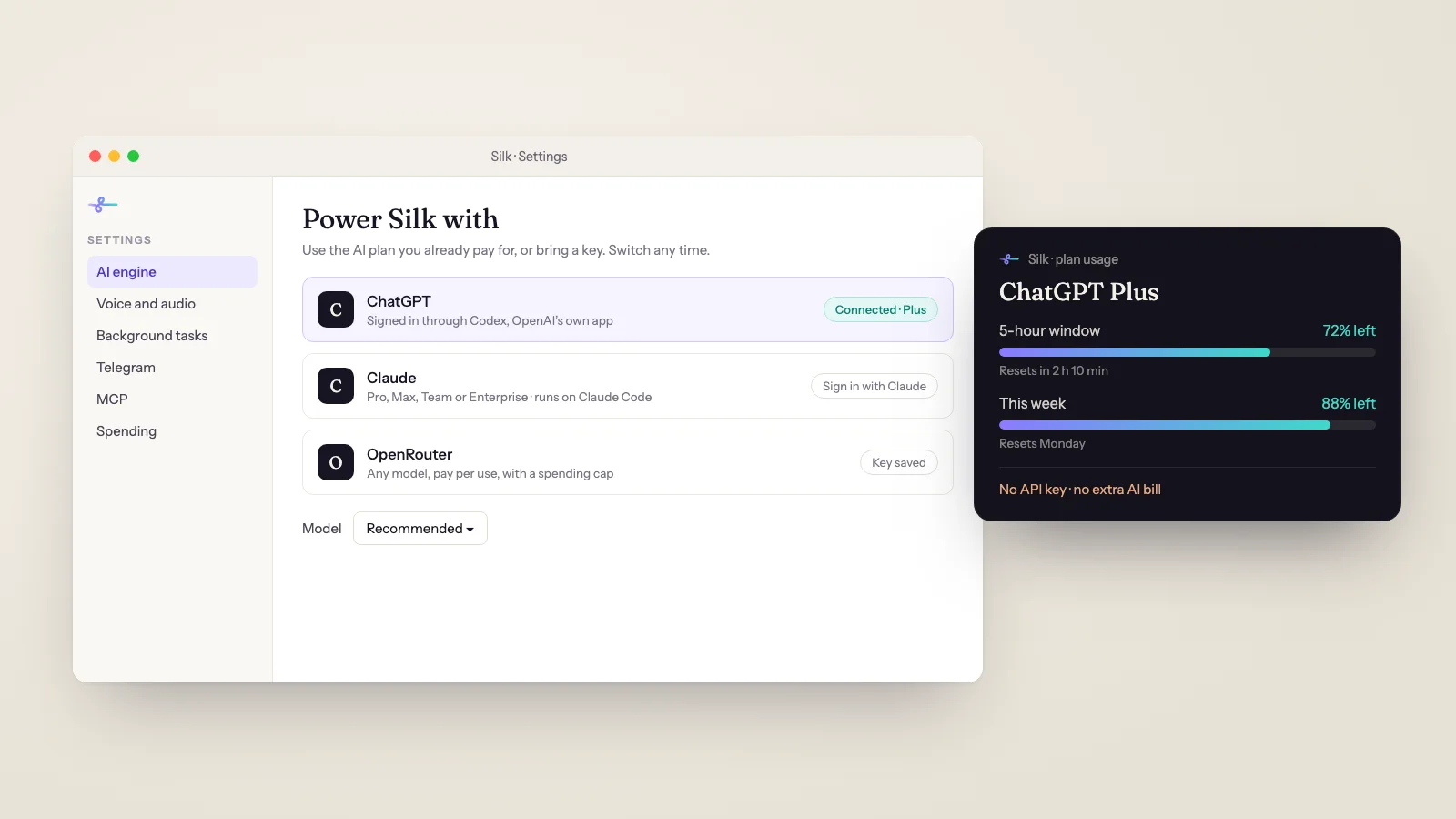
Silk, the desktop AI agent for Mac and Windows, works like this. It doesn’t come with its own AI built in. You choose what powers it:
- Your ChatGPT plan. Sign in once. Free, Go, Plus and Pro all work.
- Your Claude plan. Pro, Max, Team or Enterprise. You can even connect two Claude accounts.
- An OpenRouter key. One key runs Claude, GPT, Gemini, DeepSeek and hundreds of other models, billed by use.
Between 4 September and 3 November 2026, 37 Silk installs ran their tasks on an existing ChatGPT or Claude subscription. Those tasks made up 21% of all the jobs Silk users finished in that time.
How to run Silk on your ChatGPT plan
- Open Settings. In Silk, open Settings & tools, then under Power Silk with click ChatGPT.
- Sign in. Click Sign in with ChatGPT. Your browser opens OpenAI’s sign-in page.
- Approve Codex. OpenAI will ask you to approve Codex. That’s OpenAI’s own app, and it’s how Silk connects to your plan, so approve it.
- Check it’s connected. The ChatGPT row shows Connected with your plan name and email. Click Done.
- Leave the model on Recommended. A Model menu appears. Unless you have a reason to change it, leave it alone.
If the browser sign-in never comes back to Silk, click “Browser sign-in not working? Use a code instead”. Silk shows a code and a link you can open on any device. If ChatGPT says device codes are off, turn on “Enable device code authorization for Codex” under ChatGPT’s Settings, then Security, and try again.
How to run Silk on your Claude plan
- Open Settings. Go to Settings & tools, then under Power Silk with click Claude.
- Install Claude Code if asked. If it says Not installed, click Install Claude Code. Silk runs Anthropic’s official installer. It needs no admin password and usually takes under a minute.
- Sign in. Click Sign in with Claude, sign in in the browser and approve Claude Code.
- Click Done. The Claude row shows Connected with your plan.
Silk uses its own private copy of the Claude Code settings, so it never touches your own Claude Code login, settings or projects. That’s also why you sign in once more inside Silk, even if you already use Claude Code.
Which Claude model? Sonnet is the default and the right choice for most jobs. Opus is more capable but uses up your allowance faster. Haiku is the fastest but less careful.
Which plan should you use?
Here’s what we’ve seen in Silk’s own testing and support:
- ChatGPT Plus or Pro: the safe pick. You get the full model list. In our October benchmark the default Plus model passed 62 of 62 tasks. The Plus allowance covers about 150 typical Silk tasks every 5 hours, and roughly 1,000 a week.
- ChatGPT Free or Go: fine for trying it out. You only get the smaller model and roughly 300 to 400 tasks a month, and it’s a little less careful. Move to Plus once you rely on it.
- Claude Pro or Max: great if you already live in Claude. Your allowance is shared with your Claude app and your own Claude Code use, so a heavy day of chatting leaves less for Silk. If you connect a second Claude account, you can switch to it in Settings when the first runs out and tell Silk to continue.
- OpenRouter: best for speed and choice. On a plan, every request takes a few seconds to start, so tasks take about two to three times longer than on Silk’s default OpenRouter model. In our benchmark a background job on OpenRouter cost about 1 to 3 cents.
You can switch at any time in Settings with Change. Your saved OpenRouter key keeps working.
Five jobs to try on day one
Once you’re connected, give it work you’d normally do yourself:
- “Read my unread emails and give me a list of the ones that need a reply today, with a draft for each.”
- “Make a PDF report on this company and its five closest competitors.” (See the competitor report use case.)
- “Every morning at 8, give me today’s calls and what I know about each person.” (That’s the AI morning briefing.)
- “Rename every invoice in my Downloads folder by client and month, then move them into the Invoices folder.”
- “Rewrite the description on this Shopify product so it matches the style of the one I like.”
A note on schedules: Silk works on your computer, so scheduled jobs run while the computer is on and Silk is running. Turn on Start at login and keep the computer awake during the hours you want jobs to run.
Keeping an eye on your plan’s usage
The biggest worry with using your plan is running out halfway through the week. Silk shows 5-hour and weekly usage meters for your ChatGPT or Claude plan, so you can see how much is left while it works.
When you hit the limit, Silk stops and tells you when it resets. Your options:
- Wait for the reset.
- On Claude, switch from Opus to Sonnet, or to your second Claude account.
- Switch Silk to an OpenRouter key and keep going now.
The spend panel and spending cap in Silk only apply to OpenRouter. On a plan, your usage shows in your ChatGPT or Claude account settings, and Silk never charges you extra for it.
Honest limits
- Gemini and Copilot subscriptions don’t work with Silk. ChatGPT and Claude do.
- Free Claude accounts can’t be used. Claude Code needs a paid Claude plan.
- Plan mode is slower than Silk’s default OpenRouter model.
- Connected apps (Gmail, Google Sheets, Drive, Calendar and 1,500+ more, each with one sign-in) are for Smooth Operators community members. Everyone gets the ready-made MCP connections and the browser you’re already logged in to.
What it costs
Silk is 9 US dollars a month, and the first day is free. On your ChatGPT or Claude plan, the AI usage is already covered by what you pay them. It installs on three computers, Mac or Windows, and you can cancel any time. See pricing for the details.
Where to go next
- New to Silk? Read what Silk is and how it works, or start on the homepage.
- Wondering how this differs from just using ChatGPT? See Silk vs ChatGPT.
- Connect your business apps next: how to use MCP servers without coding.
Questions
- Can I use my ChatGPT Plus subscription in other apps?
- Yes, in apps that support it. You sign in with your ChatGPT account instead of pasting an API key, and the app's AI work counts against your plan's usage limits. Silk does this through Codex, OpenAI's own app, so OpenAI's sign-in page will ask you to approve Codex. That is expected.
- Can I use my Claude Pro or Max plan to run an AI agent?
- Yes, on a paid Claude plan (Pro, Max, Team or Enterprise). Silk runs on Claude Code, Anthropic's own app. Silk installs it for you in one click, then you click Sign in with Claude. Free Claude accounts can't be used, because Claude Code only comes with paid plans.
- Do I still need an API key or OpenRouter account?
- No. If you sign in with ChatGPT or Claude, you don't need an OpenRouter account, a key or any credits. OpenRouter is the third option for people who want to pick any model and pay only for what they use.
- Does the free ChatGPT plan work?
- It does, but it's limited. ChatGPT Free and Go only get a smaller model and a much smaller allowance, roughly 300 to 400 Silk tasks a month. Plus or Pro is the better choice for regular work.
- What happens when I hit my plan's usage limit?
- Silk stops and tells you when your allowance resets. You can wait, upgrade your plan, switch to your second Claude account if you've connected one, or switch Silk to an OpenRouter key in Settings and keep going straight away. It's never an extra Silk charge.
- Is my ChatGPT or Claude login safe?
- Silk never sees or stores your ChatGPT or Claude password or login tokens. You sign in on OpenAI's or Anthropic's own page, and their own apps (Codex and Claude Code) keep the login inside Silk's private data folder, separate from any copy you use yourself.