Silk vs Grok Bot: a team of cloud bots, or one agent on your own computer
Grok Bot gives you a team of AI bots on a shared cloud computer. Silk is one AI agent that works on your own Mac or Windows PC, on the model you choose.
Updated
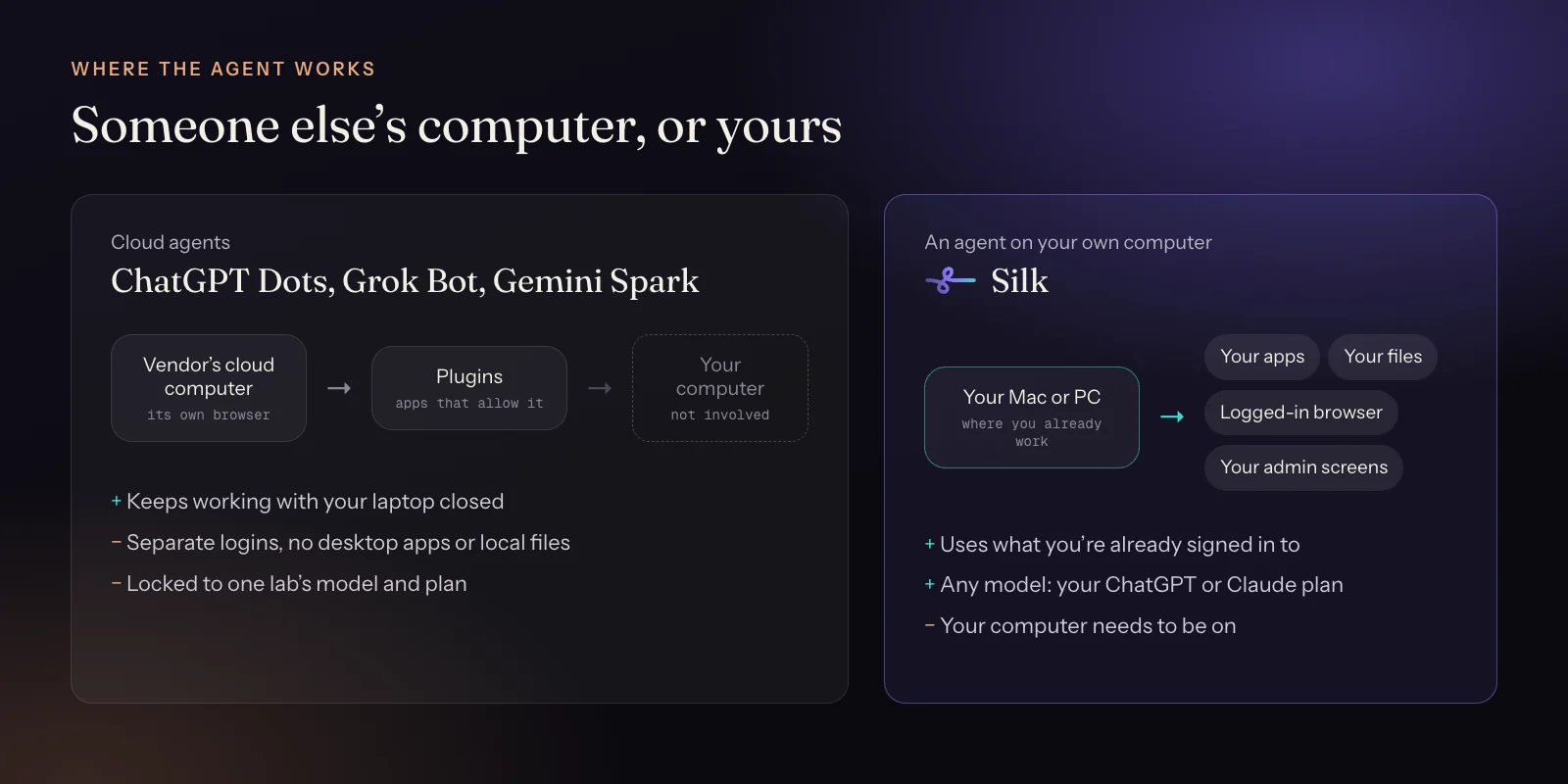
Pick Grok Bot if you want several specialist bots that pass work to each other on a cloud computer, mostly for coding, Slack and GitHub work, and you're happy with the model xAI and Cursor choose. Pick Silk if your work lives in your own apps, files and logged-in accounts, you want to choose the model, and you'd like an agent that can also show you how to do things on your screen.
| Silk | Grok Bot | |
|---|---|---|
| Where the work happens | On your own Mac or Windows computer | On one persistent cloud computer shared by your bots |
| Your apps and logins | The apps you have installed and the sites you're already signed in to | Plugins (Gmail, Calendar, Drive, Slack, Notion, GitHub, ClickUp), MCP, or signing in on the cloud computer |
| Your local files | Reads and saves straight to your folders | Files live on the cloud computer |
| Several agents | One Silk running several background jobs at once | A roster of named bots that hand work to each other |
| Runs when you walk away | Yes, while your computer is on | Yes, around the clock in the cloud |
| Schedules and triggers | Schedules set in plain words, by voice or from Telegram | Routines plus triggers from Slack, GitHub and Teams |
| Teach it by showing | Yes. Record a task once and it becomes a skill | Yes. Teach a task records a browser workflow |
| Shows you how, on your screen | Guide mode points at the button and talks you through it | No |
| AI model | Your choice: your ChatGPT plan, your Claude plan, or any model via OpenRouter | Chosen by xAI and Cursor, no model picker |
| Message it from your phone | Telegram: text, voice notes and files | iOS and Android apps |
| Price | 9 US dollars a month, first day free, AI usage covered by your ChatGPT or Claude plan | Comes with Cursor Pro (20 US dollars) or SuperGrok (30 US dollars), with usage limits and token overage |
| Platforms | Mac and Windows app, up to three computers | macOS, Windows, Linux, iOS and Android apps |
Grok Bot is xAI’s answer to the always-on agent, built with Cursor. Instead of one assistant you get a team: named bots like “executive assistant” or “AI engineer”, each with a role. They share a cloud computer and hand work to each other.
Silk takes a different approach. It’s one AI agent that works on your own Mac or Windows computer. It runs as many background jobs as you give it, remembers you between jobs, and uses the apps and accounts you’re already signed in to.
A team in the cloud, or one agent at home
Grok Bot’s team idea is clever if you think in roles. You build a small org chart of bots and route work through it. The cost is setup and management. Someone has to design the bots, and xAI’s own guidance favours narrow, single-purpose bots over one bot that does everything.
Silk skips the org chart. You say what you want, out loud or typed, and Silk plans it, picks the mode and does it. If you hand it five jobs, it runs five background jobs side by side, each with its own progress card. Everything it learns about you goes into one memory you can open and edit.
Your computer vs a shared cloud computer
Grok Bot’s bots share one persistent cloud computer. Log in to a site with one bot and every bot can use that login. That’s handy, but it also means your accounts sit on a machine you don’t control.
Silk works on the computer you already use. Your WordPress admin, your Shopify store, your GoHighLevel sub-accounts, your Mac Mail and your local folders are already there and already signed in. When a site needs a password or a code, Silk stops and hands you the window with an “I’m signed in” button. It never asks you to type a password into a chat.
What the work looks like
Grok Bot’s best demos are about code: pull requests, Slack threads, dashboards. Silk’s most common jobs, from 60 days of real usage between September and November 2026, look like this:
- Morning briefings and nightly recaps, set up just by asking. 215 recurring jobs fired 2,436 times.
- Social posts that go out on their own. Social tasks grew 7.1 times in 30 days, from about 59 runs a month to 419.
- Competitor and market reports as polished PDFs. Research is the most common job, with an 86% success rate.
- SEO fixes made on the live website, the biggest single job people hand off, at around 20 minutes each.
- Shopify, GoHighLevel and newsletter admin work, done in the real admin screens.
Teaching it a job
Both products learn by watching. Grok Bot’s “Teach a task” records a browser workflow. Silk’s Record-a-Skill records you doing a job once, in a browser or a desktop app, and turns it into a skill you can replay, schedule or trigger from Telegram. Across all uses, 22 Silk users have recorded 233 skills so far.
Silk also works the other way round. In Guide mode it watches your screen and teaches you: it points at the right button, circles it and talks you through it.
Model choice and price
Grok Bot comes with Cursor Pro (20 US dollars a month) or SuperGrok (30 US dollars a month). There’s a weekly usage allowance, extra usage is billed at token cost, and the model is chosen for you.
Silk Premium is 9 US dollars a month, the first day is free, and it covers up to three computers. Sign in with your ChatGPT plan or your Claude Pro or Max plan and the AI usage is already paid for. Or use an OpenRouter key and pick from hundreds of models. A typical successful Silk task costs about a third of a cent in AI fees.
When Grok Bot is the better pick
- You want several specialist bots passing work to each other.
- Your day runs on GitHub, Slack and Cursor.
- You need it working with your computer switched off.
- You want an agent that can post to X directly.
When Silk is the better pick
- Your work happens in your own apps, admin screens and folders.
- You want to choose the AI model, or use a plan you already pay for.
- You want an agent that can show you how as well as do it for you.
- You’d rather have one agent that knows everything than a team to manage.
Compare Silk with the rest of the field in the best always-on AI agents of 2026, or read Silk vs ChatGPT Dots.
Questions
- What is Grok Bot?
- Grok Bot is xAI's always-on agent app, launched on 11 August 2026 and built with Cursor. You create named bots with a title and description, and they work on a shared cloud computer with a browser, files and terminal. They run routines and hand tasks to each other. It comes with Cursor Pro and SuperGrok plans.
- What is a good Grok Bot alternative?
- If you'd rather the agent worked on your own computer, with your apps, files and logins, Silk is the closest alternative, at 9 US dollars a month on the AI model you choose. For another cloud agent, ChatGPT Dots is the big-lab option. For free and self-hosted, OpenClaw and Hermes Agent are the best known.
- Is Grok Bot only for coding?
- No, but that's where it's strongest. It came out of Cursor, so it's deeply tied to GitHub, Slack and code. Silk is aimed at solo business owners: marketing, publishing, research, CRMs, ecommerce and admin.
- Can I choose the AI model in Grok Bot?
- No. xAI and Cursor pick the model. In Silk you choose: run it on your ChatGPT plan, your Claude Pro or Max plan, or any model through an OpenRouter key.
- Can Silk run several agents like Grok Bot?
- Silk is one agent that runs several background jobs side by side, each with its own live card. It doesn't have a roster of named bots that message each other. For most solo business owners, one agent that remembers everything and runs jobs in parallel is simpler to manage.